SureForms – Drag and Drop Form Builder for WordPress

🎨 SureForms – Drag and Drop Form Builder for WordPress
WPThemeDetector has detected that SureForms – Drag and Drop Form Builder for WordPress is a popular WordPress plugin, which is expertly developed by the talented author named ! It has an impressive 5 out of 5 ratings (based on 31 user reviews), with up to 200000 number of downloads, showcasing its wide user base and trust. : This plugin infomation is last updated on January 28, 2026.
Download Plugin Best Web HostingIn this section, WPThemeDetector provides detailed information about the WordPress plugin SureForms – Drag and Drop Form Builder for WordPress, including the plugin’s author, the latest version, user reviews & ratings, downloads, screenshots, etc.
| Plugin Name | SureForms – Drag and Drop Form Builder for WordPress 🔗 |
| Popularity | Active Installs: 200000🔹Star Ratings: 🔹User Reviews: 31 |
| More Info | Current Version: 1.7.2🔹Author: 🔹Last Updated On: 🔹Required WP: 6.4🔹Required PHP: 7.4 |
| Tags | |
| Description | SUREFORMS – THE BEST NO-CODE FORM BUILDERCREATE BEAUTIFUL RESPONSIVE FORMS USING WORDPRESS WITHOUT CODING ⚡★★★★★ Our mission at SureForms is to empower you to build beautiful forms without code. We’re taking a fresh approach by harnessing the power of WordPress’s native drag-and-drop interface. Our goal is to provide our customers with a seamless and intuitive form-building experience, eliminating the need to learn a whole new interface. We recognize the importance of good design and user experience, especially when it comes to forms. After all, the ultimate aim of most websites is to get those forms filled out. “Unfortunately, many website owners struggle to design forms that match the overall website aesthetics and user experience.” Try the live demo of SureForms SureForms addresses several pain points commonly experienced by website owners:
In response to these pain points, we set out to create SureForms. Our goal is to provide a fresh and innovative form builder that leverages the power of native WordPress drag-and-drop builder, delivering a seamless and intuitive form-building experience. We want to empower website makers to effortlessly create stunning, modern-looking forms right out of the box, eliminating the need for extensive customization or reliance on external styling elements. That’s why we’re committed to delivering stunning, modern-looking forms right out of the box. Gone are the days of relying on themes for styling or spending endless hours tweaking settings and writing custom CSS. With SureForms, our customers can expect a delightful range of pre-made form styling that will make their forms look amazing from the very start. And if they want to infuse their personal touch, customizing the styling should be a breeze, whether it’s through easy-to-use settings or diving into CSS. We’re here to empower our customers to create forms that not only function flawlessly but also captivate their audience. Say goodbye to the mundane and hello to a whole new level of form-building experience. With SureForms, let’s revolutionize the way people create and design forms for their websites. HOW IT WORKS ❓From installation to creating your first form, SureForms is designed to be simple and intuitive. Here is how it works: Step 1. Install WordPress Plugin 🔌From your WordPress dashboard, navigate to the Plugins menu and click on the “Add New” button. Search for the SureForms plugin, then click “Install Now” and “Activate”. Step 2. Build your Form ⚙️Once the plugin is installed, you will be redirected to the SureForms dashboard page in your WordPress dashboard. There you will find a button to create a new form. Click it to build and customize your form using the SureForms interface to suit your requirements. Step 3. Embed your Form 📄Once your form is ready, easily embed it on any page or post using the provided shortcode or block. SOME POWERFUL FEATURES OF SUREFORMS 💪SureForms is packed with features that will help you create forms fast and save time. Below are some of the top features it offers: Native WordPressSureForms leverages the power of WordPress’s native block editor, as its foundation. This integration provides a seamless and intuitive form-building experience for users familiar with the WordPress ecosystem. By utilizing drag-and-drop interface, SureForms eliminates the need to learn a separate form builder, saving time and simplifying the form creation process. Create Forms Effortlessly with AISureForms empowers users to build custom forms effortlessly using AI. Whether you’re creating simple contact forms or complex multi-step surveys, our AI engine intelligently guides you through the process, offering suggestions and optimizing form fields based on your needs. No need to worry about the details—AI does the heavy lifting, helping you craft forms that are functional, user-friendly, and tailored to your audience with just a few clicks. Here are a few examples of forms you can create with SureForms AI:
No-Code FlexibilitySureForms caters to users who may not possess extensive coding knowledge. It offers a range of advanced form features, such as conditional logic, multi-step forms, dynamic data handling, and query parameters, all accessible through an intuitive, no-code interface. This empowers users of all levels to create sophisticated and interactive forms without the need for custom coding. Mobile-FirstSureForms recognizes the importance of mobile responsiveness. The forms created with SureForms are designed with a mobile-first approach, ensuring they look and function flawlessly on various devices. Instant FormsPublish forms instantly as a URL that can be easily shared across the web, via email, or social media. Make our forms available to anyone, anywhere. Multi-Column LayoutsArrange input fields into multiple columns to create a sleek and efficient form layout. This approach enhances the form’s appearance, making it appear more condensed and visually appealing, thereby reducing the likelihood of users abandoning the form. Place input fields in multiple columns to customize the layout according to your preferences. Input FieldsSureForms comes with 15+ fields to build your form:
Inline Field ValidationReal-time validation for form fields provides instant feedback to users if they enter incorrect or incomplete information. This ensures data accuracy and enhances the user experience. GDPR ComplianceEnsure your forms are compliant with GDPR regulations to protect user data and privacy. Anti-SpamAnti-spam measures protect forms from unwanted submissions. Built-in spam protection ensures form submissions are genuine and reliable. Integrate with Google reCAPTCHA, providing an additional layer of security against spam and bots, ensuring the integrity of form submissions. Honeypot field to detect and prevent automated form submissions. This hidden field helps identify and block spam bots without requiring any user interaction. ConfirmationsCustomize confirmation messages or redirections that are displayed to users after successful form submissions. Tailor these messages to provide personalized feedback or redirect respondents to specific pages. Email NotificationsConfigure customized email notifications triggered by form submissions. Specify recipients, email templates, and personalized messages to stay informed and automate communication. Form EntriesStores form entries securely to access and manage form submission data within the WordPress dashboard. Review, export, or perform actions on form entries as needed. Visual Data ReportingAnalyze and gain insights from form submissions through interactive charts, graphs, and data visualizations. Take data-driven decisions. Developer-Friendly CustomizationFor developers seeking advanced customization options, SureForms provides clean APIs, extensive hooks, and developer-friendly code. This allows developers to extend and integrate SureForms with other systems, plugins, or themes seamlessly. The plugin’s code is designed to be accessible and well-structured, making it easy for developers to customize and tailor the forms to their specific requirements. WHO CAN BENEFIT FROM SUREFORMS?Any individual or organization that wants to create forms to gather information from their users can greatly benefit from using SureForms.
There is no limit to the types of businesses and organizations that can benefit from using SureForms. SOME OF THE WORDPRESS THEMES & PLUGINS SUREFORMS SUPPORTS 🔗SureForms works with any theme, including:
SureForms is compatible with all plugins, including:
BRANDING GUIDELINESureForms® is a registered trademark. Please use the following format when mentioning SureForms anywhere:
CONNECT WITH OUR TEAM AND COMMUNITYJoin our Facebook group community: Learn the tricks and techniques that other SureForms users are using to grow their business. Also, get exciting insider information on upcoming feature releases. WANT TO CONTRIBUTE TO THE PLUGIN?You may now contribute to the plugin on GitHub USE OF 3RD PARTY SERVICESTo improve the user experience, SureForms may use the following 3rd party services if the required features are enabled:
|
| Screenshot | 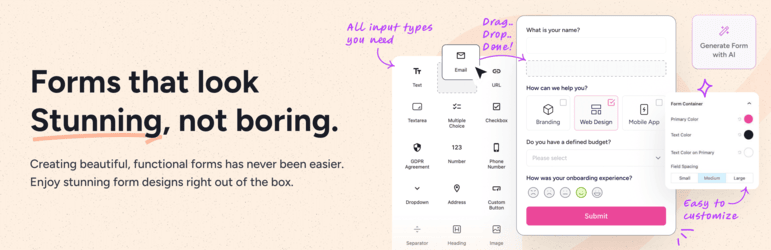 |
| Plugin Homepage | Download This Plugin |
SureForms – Drag and Drop Form Builder for WordPress Website Examples
WP Theme Detector analyzes public information on WordPress websites. Information may not be 100% accurate. Some plugins cannot be detected, and others have poor detection accuracy. It is cached for a certain period to reduce load.
🔥Recommended WordPress resources
WordPress is a versatile and powerful platform, and creating a website in 2026 requires the right resources. Here are some recommended tools to help you make the most of your WordPress journey: