Bootstrap for Contact Form 7

🎨 Bootstrap for Contact Form 7
WPThemeDetector has detected that Bootstrap for Contact Form 7 is a popular WordPress plugin, which is expertly developed by the talented author named ! It has an impressive 4.8 out of 5 ratings (based on 26 user reviews), with up to 10000 number of downloads, showcasing its wide user base and trust. : This plugin infomation is last updated on December 15, 2025.
Download Plugin Best Web HostingIn this section, WPThemeDetector provides detailed information about the WordPress plugin Bootstrap for Contact Form 7, including the plugin’s author, the latest version, user reviews & ratings, downloads, screenshots, etc.
| Plugin Name | Bootstrap for Contact Form 7 🔗 |
| Popularity | Active Installs: 10000🔹Star Ratings: 🔹User Reviews: 26 |
| More Info | Current Version: 1.4.8🔹Author: 🔹Last Updated On: 🔹Required WP: 3.6🔹Required PHP: Unknown |
| Tags | |
| Description | Bootstrap for Contact Form 7 modifies all the output of the popular Contact Form 7 plugin to be fully compatible with the current version 3 of the popular CSS framework Bootstrap. What this means to you as a Bootstrap user: No additional CSS rules necessary – from now on, Contact Form 7 integrates seamlessly with the overall Bootstrap design. It is even possible to use different form layouts via Contact Form 7’s “Additional Settings” tab.
UsageBootstrap for Contact Form 7 does not provide additional options itself, so you can continue using Contact Form 7 (almost) the same way you did before. The plugin will not break your form’s appearance, however it is recommended to adjust the contact form shortcodes to achieve perfect results: Generally, you should not be using HTML tags any longer to wrap the field shortcodes. They already include the complete Bootstrap-ready markup, including displaying labels. Read the Setup Guide for a quick introduction. Advanced FeaturesThe plugin brings some additional useful features to enhance your forms even more:
The above features are explained in detail on the Other Notes page. Basic Idea behind the PluginLots of WordPress Themes are based on Bootstrap – and while it is the general approach to use CSS rules to style your HTML content, it is also possible the other way around – with many benefits. When using a well-known framework which provides general styles for all the important components of a website, it can be time-consuming to apply the same styles to third-party plugins which (obviously) have not been written with a framework in mind. This is perfectly fine, but if you’re using Bootstrap for your WordPress theme, you will certainly love the fact that you do not need to write CSS rules for the Contact Form 7 plugin any longer. It will all look like Bootstrap from the beginning so that it fits into your website design. If you’re not using Bootstrap, this plugin is useless for you – but maybe you’re just having an idea how you can adjust another popular WordPress plugin to integrate with another well-written CSS framework. Advanced FeaturesAdditional Settings
You can adjust several form properties (properties that affect an entire form, not just a single field of it) to give your forms the appearance you want. Here is a list of the properties, what they do and their possible values:
There are four methods to adjust the above properties: The easiest one is to use the “Additional Settings” tab when editing a form in Contact Form 7 and insert any property and its desired value there, one per line. For example: Alternatively you can use the filter The third way does something slightly different from the other two since it does not change a specific form’s properties, but the default properties for all forms. To do that, you should use the filter The fourth method is different from the others as it allows to override the form settings on a per-field basis. You can add any of the setting names plus its intended value as a shortcode attribute for any field to make this field behave differently from the form’s setting. This can be especially helpful if you need to create advanced form layouts like when you need multiple fields on the same line. For example, you could do the following to display two fields in one row, even though the form’s Note that the custom form filter takes precedence over the properties defined in the admin, while the default filter is just used as fallback. Input GroupsAll textual input fields support the input group feature that Bootstrap provides. To use it, add a shortcode-like construct (almost, but it has to use curly braces instead) into the content of any text / email / url / tel input shortcode. Example: Note that the Submit Button AlignmentThe submit button can be aligned left, center or right to fit your form’s desired appearance. Simply provide an Inline Character CountContact Form 7 provides a By the way, have you read the information about input groups above? You can combine those with the character count (because just seeing a number without any additional information might confuse your site’s visitors). The following example will show a message like ‘433 characters left’ after the field: Inline Captcha ImageIf you’ve been using Contact Form 7 together with the Really Simple CAPTCHA plugin, you are probably aware of the Custom Form URLsYou can add GET parameters to populate your forms with custom initial values by simply using the field name as parameter’s key and the desired value as the parameter’s value. This works with checkboxes, date fields, number fields, select fields, all text fields and textareas. The easiest way to create such a URL is to use the plugin’s function Filter Field ArgumentsAs of version 1.2.3, field arguments for every single field can be filtered, which allows you to basically modify anything you like. The filters you need to hook your function into have the following structure Unsupported functionalityWhile the plugin tries to support as many features as possible from the original Contact Form 7 (in combination with adding new ones!), not everything is and can be supported. There are two things in particular which are explicitly not supported:
If you discover any other Contact Form 7 feature than the above two which is not supported by Bootstrap for Contact Form 7, you can raise an issue or submit a support request. continue reading... |
| Screenshot | 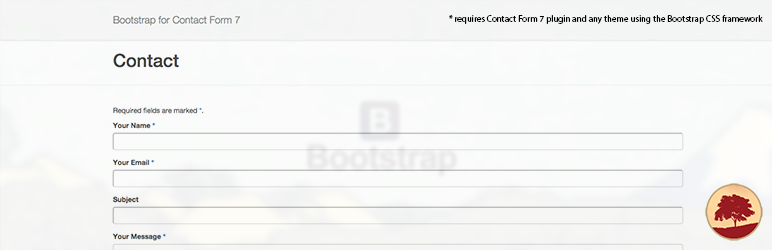 |
| Plugin Homepage | Download This Plugin |
Bootstrap for Contact Form 7 Website Examples
WP Theme Detector analyzes public information on WordPress websites. Information may not be 100% accurate. Some plugins cannot be detected, and others have poor detection accuracy. It is cached for a certain period to reduce load.
🔥Recommended WordPress resources
WordPress is a versatile and powerful platform, and creating a website in 2025 requires the right resources. Here are some recommended tools to help you make the most of your WordPress journey: